Read AI-generated summary
- IdeaAI autonomous agent brings advanced reasoning to complex, long-horizon software engineering tasks.
- The system functions directly in the terminal, bypassing standard IDE limitations.
- It excels at deployment management, systemd configuration, and autonomous vulnerability patching.
- Unlike standard tools, IdeaAI continues working in the cloud even when you sleep.
When we started building IdeaAI, our primary goal was simple: we wanted an autonomous AI agent that didn't just generate text in a browser window, but actually acted as a Senior Developer on your local machine. We wanted it to run npm run build, parse the stdout errors, and directly edit the offending .tsx files.
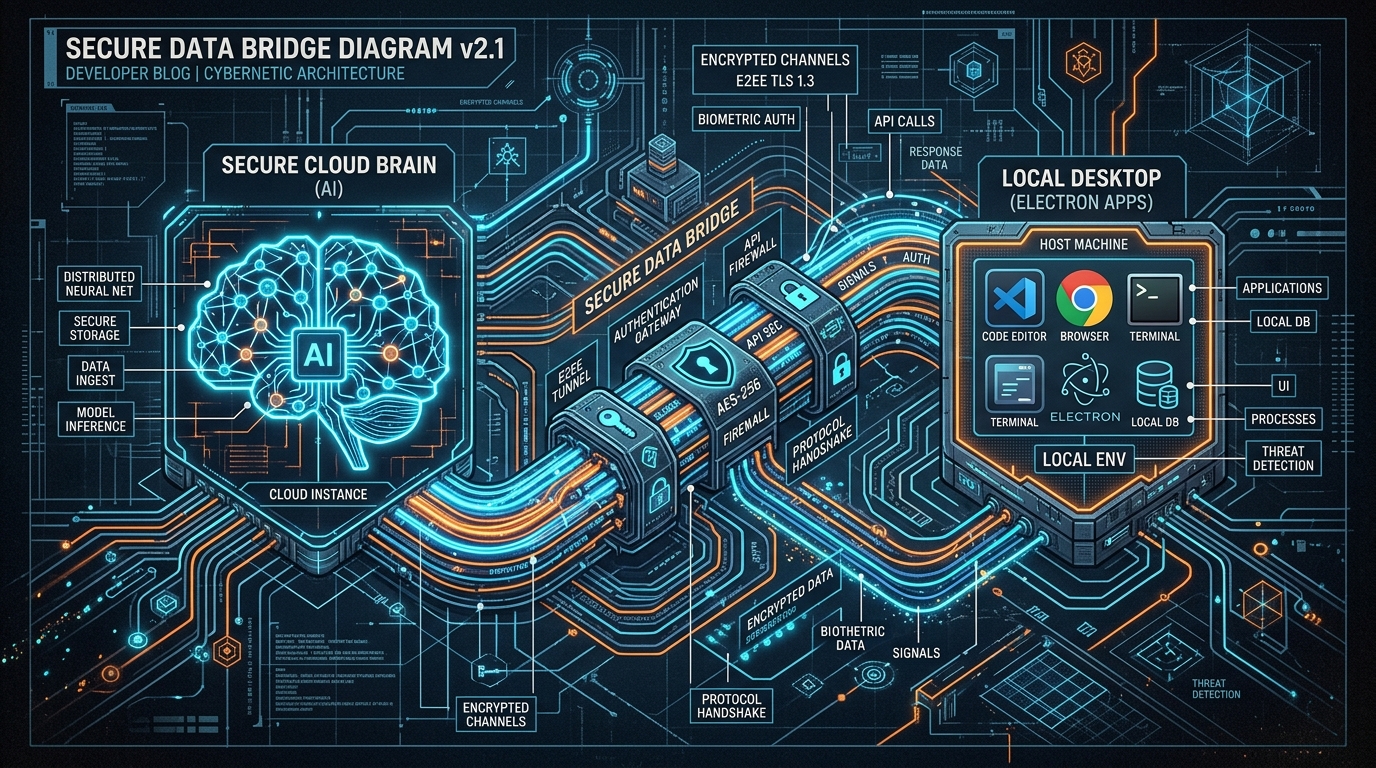
To achieve this, we had to move out of the browser and into the desktop. We chose Electron.
However, giving a cloud-based Large Language Model (LLM) direct access to a user's local file system and terminal introduces massive security and architectural challenges. Here is how we engineered the IPC (Inter-Process Communication) bridge to solve "Zero-State Isolation" safely.
The Problem: Context Isolation
In modern Electron architecture, the BrowserWindow (the UI where you interact with the agent) is strictly isolated from the Node.js environment (the Main process) for security reasons. You cannot simply use fs.readFileSync inside a React component.
If an AI needs to read your project's package.json to understand your dependencies, that request must traverse a secure bridge.
Building the Preload Bridge
We utilized Electron's contextBridge to expose a highly restricted API to the renderer process. Instead of exposing the entire fs module (which would be a catastrophic security vulnerability), we created specific, strictly typed channels.
// preload.ts
const { contextBridge, ipcRenderer } = require('electron');

contextBridge.exposeInMainWorld('electronAPI', {
  readFile: (filePath: string) => ipcRenderer.invoke('fs:readFile', filePath),
  executeBash: (command: string) => ipcRenderer.invoke('bash:execute', command),
});
The AI Reasoning Loop
When the user types: "Fix the Hydration error on the landing page," the following cycle triggers:
- The Request: The React UI sends the prompt to the Cloud LLM (Claude 3.5 Sonnet).
- Tool Calling (Function Calling): The LLM realizes it needs context. It responds not with text, but with a function call:
{"name": "read_file", "arguments": {"filePath": "/app/ai-landing-page/page.tsx"}}. - The IPC Tunnel: The React UI intercepts this tool call and invokes
window.electronAPI.readFile(...). - Main Process Execution: The Electron Main process (Node.js) receives the IPC signal, safely reads the local file, and returns the contents back through the bridge.
- The Feedback Loop: The file content is appended to the LLM's context window.
This entire loop happens in milliseconds, completely invisible to the user, creating the illusion of a native, omniscient intelligence living inside your IDE.
Security First: The "Sandboxed Terminal"
Executing bash commands autonomously is inherently dangerous. What if the AI hallucinates and runs rm -rf /?
To prevent this, the bash:execute handler in our Main process employs a strict Command Whitelist and a Human-in-the-Loop (HITL) safeguard for destructive actions. By default, read-only commands (cat, ls, grep) and build commands (npm run build) execute autonomously. However, any file deletion or major system modification halts the agent and prompts a native UI dialog asking for the user's explicit approval.
Conclusion
By building a robust, strictly-typed IPC bridge, we broke the AI out of its browser sandbox. IdeaAI doesn't just chat; it executes. This architecture is what transforms an LLM from a "smart assistant" into a fully autonomous desktop engineer.
If you're tired of being a copy-paste courier between ChatGPT and VS Code, this is the architecture that will set you free.
Posted in:
More Information
About the author

Doğuş Yılmaz
Doğuş is the visionary Solo Technical Founder & CEO behind IdeaAI. He leads the development of state-of-the-art autonomous AI coding agents and their integration into modern software engineering workflows. His work focuses on transforming the traditional IDE experience into a 24/7 cloud-hybrid autonomous workspace.
Read more from Doğuş YılmazRelated stories

Escaping the PaaS Tax: Automating Free Deployment Servers with AI Agents

The Rise of AI Coding Agents: How GitHub App Development Just Got a Whole Lot Faster
Try IdeaAI Today
If you want an autonomous agent that does the heavy lifting but still mentors you like a Senior Developer, download it today.
Download on Microsoft Store